

Crochet Flower Square Pattern


Crochet Flower Square is such a delightful and charming pattern that brings a touch of beauty to any crochet project. The intricate design of the flower in the square adds a lovely and whimsical element that can brighten up blankets, scarves, or even pillow covers. Whether you're a beginner or a seasoned crocheter, creating a Crochet Flower Square can be a fun and rewarding experience. So grab your favorite colorful yarn and crochet hook, and get ready to add a pop of floral charm to your next creation!
Materials Needed
- Various yarns (different colors and thicknesses)
- Crochet hook (4.5 mm)
Instructions
Start with a Magic Circle
Twist the yarn around two fingers to create a loop.
Insert the hook into the loop, yarn over, and pull through to make a chain.
Round 1
Chain 2 (this counts as the first Double Crochet, DC).
Crochet 15 more Double Crochets (DC) inside the magic circle.
Slip stitch into the first Double Crochet to close the round.
Chain 1 and cut the yarn.
Round 2
Attach a new color yarn (e.g., light pink) by creating a slip knot and pulling it through any stitch from the previous round.
Make a chain of 1.
Start making a cluster or bobble stitch: Yarn over (YO), insert the hook into the same stitch, pull up a loop (3 loops on hook), YO, pull through 2 loops, repeat until you have 4 loops on the hook then YO and pull through all loops to form the first bobble stitch.
Chain 1.
Repeat the bobble stitch in each stitch around, chaining 1 between each bobble.
Slip stitch to join the round and secure. Cut yarn.
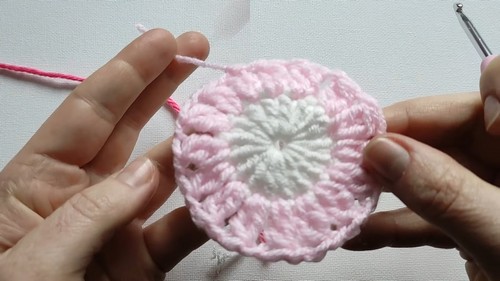
Round 3
Attach another new color yarn (e.g., dark pink) by creating a slip knot and pulling it through any chain-one space from the previous round.
Chain 2.
Create a bobble stitch in the same space, chain 1, and add another bobble stitch in the same space.
Chain 2 and make a single crochet in the next chain-one space.
Chain 2 and repeat the pattern [bobble, chain 1, bobble in the same space, chain 2, single crochet in the next space] around.
Slip stitch to join the round and secure. Cut yarn.
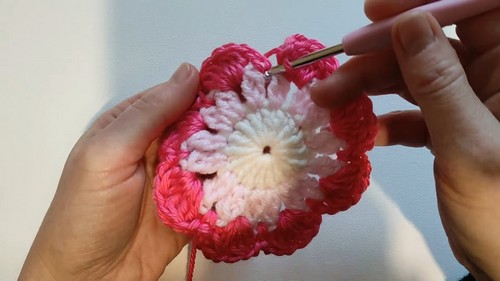
Round 4 (Forming the Square)
Attach a green or contrasting yarn for petals.
Find any space, attach yarn, make a chain 3 (counts as first treble crochet).
In the same space, make one more treble crochet, chain 3, and two more treble crochets to form the first corner.
Move to the next chain-one space, make 1 double crochet in each until you reach the next corner.
Repeat the corner pattern [2 treble crochets, chain 3, 2 treble crochets].
Continue around making treble and double crochets as per the pattern.
Slip stitch to join the round and twist/secure the yarn.
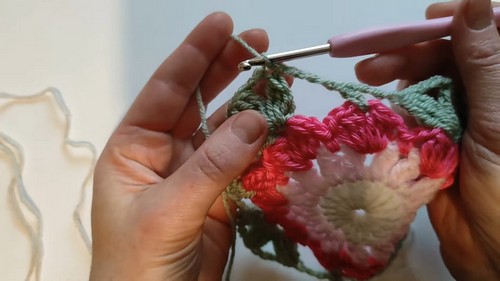
Round 5 (Edging)
Change to another color if preferred, attach new yarn.
Start with chain 1, and make double crochets along each side and in the corners make [2 double crochets, chain 3, 2 double crochets].
Continue around until you complete the square, ensuring all corners and sides are neat.
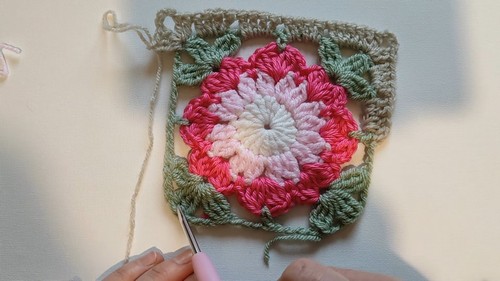
Final Step
Finish off by blocking the square to give it a final shape.
Weave in all loose ends.
Since you changed the way patterns can be downloaded I can't copy a pattern because the only place I know how to do it is in the place called / add to home screen /. My PDF place or whatever it's called doesn't work either. So unless I'm ready to write out a pattern I have to forgo getting it. If possible can you please add that /add to home screen / place again ?
Thank you so much if that's possible. Yours sincerely ,
Merry Obrzut
Thank you for letting us know, Merry.
I'm sorry you're having trouble saving patterns. The Print version button should still allow you to print or save the pattern as a PDF, so it sounds like something isn't working correctly on your device.
Could you please let us know what happens when you tap Print version? Does nothing happen, or do you see an error? Also, what device and browser are you using? This will help us investigate the issue.